![Qvalia Logo New Blue transparent.png]](https://knowledge.qvalia.com/hs-fs/hubfs/Qvalia%20Logo%20New%20Blue%20transparent.png?height=24&name=Qvalia%20Logo%20New%20Blue%20transparent.png)
How to do it
- Open the relevant invoice.
- Check that the invoice number, sender and recipient are correct.
- Choose to download or print the invoice.
- Download any attachments separately if they are shown as individual documents.
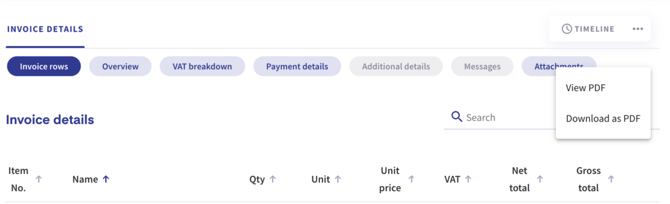
A PDF and source file are not the same thing
The PDF is a visual presentation of the invoice data. The structured source file contains the fields that were sent or received.
An original file may be shown for messages received as files. An invoice created directly in Qvalia does not always have a separate original file to display.
If you need many invoices
The interface is intended for downloading one invoice at a time. If you need a consolidated extract, Qvalia can assist under a separate agreement. See the article on consolidated exports.
If it still does not work
- Check once more: the correct company, user access and that the invoice is open.
- Have this ready when contacting support: invoice number, company, date and the version you need.
- Contact support: through the support form at the bottom of https://qvalia.com or at help@qvalia.com.